Display problems (oXygen Editor 28.1, Open JDK 21)
-
adamretter
- Posts: 5
- Joined: Fri May 28, 2010 7:59 pm
- Contact:
Display problems (oXygen Editor 28.1, Open JDK 21)
Hi there,
I have oXygen 28.1 and OpenJDK 21.0.10.
I can't use the bundled JDK as it is not compatible with my OS (FreeBSD 15/stable).
My desktop environment in Hyprland.
I launch oXygen by running `JAVA_VERSION=21 /usr/local/oxygen/oxygen.sh`.
Unfortunately the oXygen UI is barely usable on my system. I think it is running under XWayland, and so I hope it is not a Wayland compatibility issue. I think the issue behind everything is likely missing fonts. I am hopeful there is a simple way to install the missing fonts or tell oXygen where to find them (if I already have them perhaps in a non-usual place)?
The two main issues I have (see screenshot: https://static.evolvedbinary.com/Screen ... .08.55.png)
1. The fonts in the UI are extremely small and very pixelated. Increasing the font size in the preferences does increase the size, but the extreme pixelation remains.
2. The cursor in the main editor window when editing XML is unreliable, it is very hard to tell if it is before or after a particular character and makes it almost impossible to reliably edit text. Also some of the characters appear to slightly overlap. Again I suspect a font issue.
Please advise...
I saw this thread - common-problems/topic26715.html however it seems entirely unrelated to my issues, and I could not find the same issues described in any other thread.
As an aside, to try and workaround my issues, I also have a Ubuntu 26.04 Virtual Machine with X11 and Temurin JDK 21 installed, and I installed a copy of oXygen 28.1 there too.. If I try and run oXygen from that Virtual Machine over SSH X11 forwarding from my FreeBSD host - e.g. `ssh -Y aretter@ubuntu-vm /opt/oxygen/oxygen.sh` then I get oXygen's New File dialog (still with broken pixelated fonts), but after that the main window opens but remains entirely blank.
I have oXygen 28.1 and OpenJDK 21.0.10.
I can't use the bundled JDK as it is not compatible with my OS (FreeBSD 15/stable).
My desktop environment in Hyprland.
I launch oXygen by running `JAVA_VERSION=21 /usr/local/oxygen/oxygen.sh`.
Unfortunately the oXygen UI is barely usable on my system. I think it is running under XWayland, and so I hope it is not a Wayland compatibility issue. I think the issue behind everything is likely missing fonts. I am hopeful there is a simple way to install the missing fonts or tell oXygen where to find them (if I already have them perhaps in a non-usual place)?
The two main issues I have (see screenshot: https://static.evolvedbinary.com/Screen ... .08.55.png)
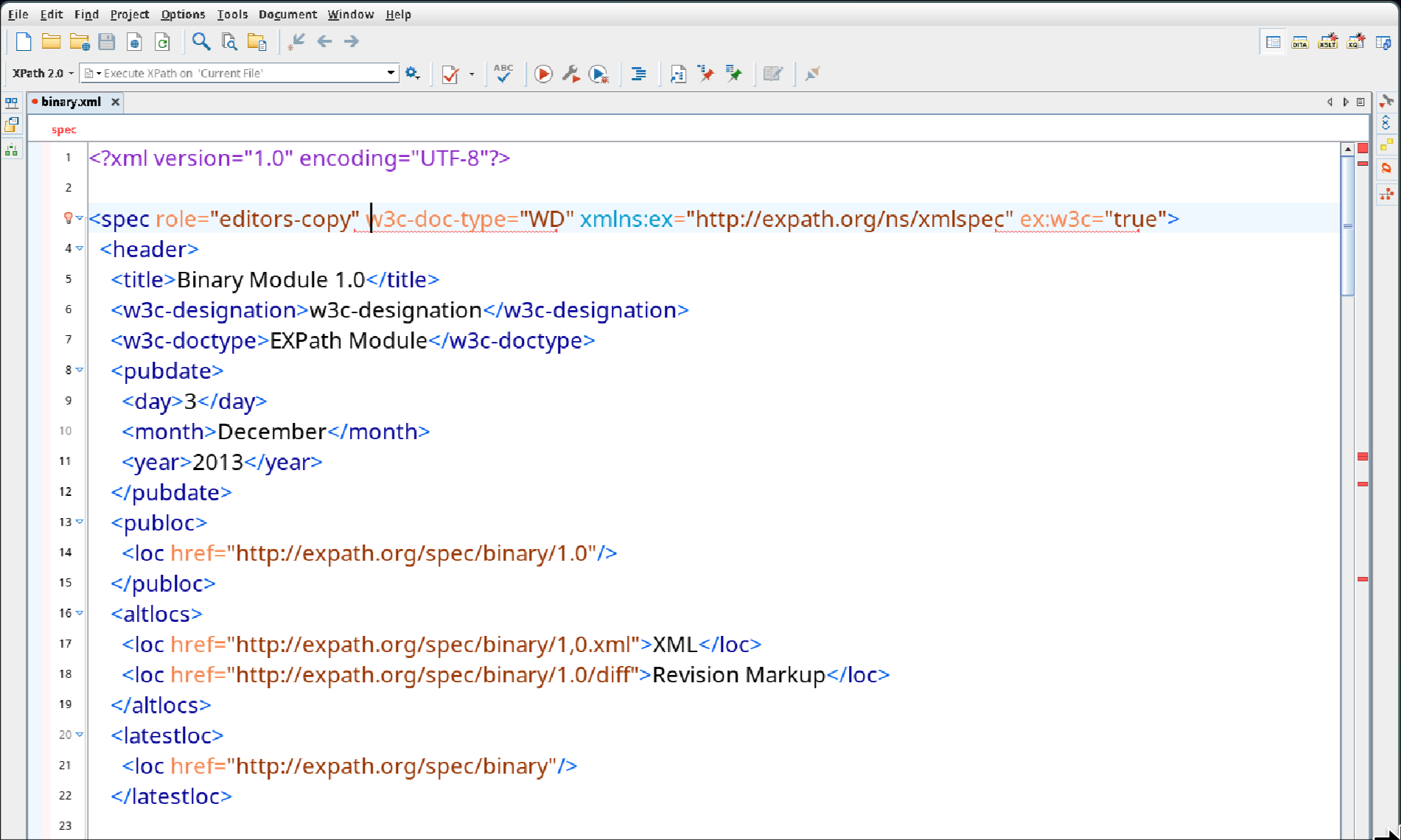
1. The fonts in the UI are extremely small and very pixelated. Increasing the font size in the preferences does increase the size, but the extreme pixelation remains.
2. The cursor in the main editor window when editing XML is unreliable, it is very hard to tell if it is before or after a particular character and makes it almost impossible to reliably edit text. Also some of the characters appear to slightly overlap. Again I suspect a font issue.
Please advise...
I saw this thread - common-problems/topic26715.html however it seems entirely unrelated to my issues, and I could not find the same issues described in any other thread.
As an aside, to try and workaround my issues, I also have a Ubuntu 26.04 Virtual Machine with X11 and Temurin JDK 21 installed, and I installed a copy of oXygen 28.1 there too.. If I try and run oXygen from that Virtual Machine over SSH X11 forwarding from my FreeBSD host - e.g. `ssh -Y aretter@ubuntu-vm /opt/oxygen/oxygen.sh` then I get oXygen's New File dialog (still with broken pixelated fonts), but after that the main window opens but remains entirely blank.
-
adrian
- Posts: 2903
- Joined: Tue May 17, 2005 4:01 pm
Re: Display problems (oXygen Editor 28.1, Open JDK 21)
Hello,
I don't think this is mainly missing fonts. The screenshot and the setup point to three separate Java-on-XWayland problems that are common on tiling compositors like Hyprland.
1. Pixelation comes from scaling, not fonts. If the Hyprland monitor scale is above 1, XWayland clients render at 1x and the compositor upscales the bitmap. This produces text that's blurry or pixelated however large the font is. If you have already set force_zero_scaling, the app renders natively but at 1x, which explains the "extremely small" UI. The usual fix is to let XWayland render at native resolution and have Java do the scaling itself, with an integer factor:
# hyprland.conf
Then launch Java/Oxygen with -Dsun.java2d.uiScale=2, or set GDK_SCALE=2. Avoid fractional Java scales (1.25, 1.5). Swing's text layout may misplace the caret and crowd glyphs at fractional scales, which would also explain your second complaint.
2. Antialiasing is probably off. Java reads its text-antialiasing settings from the desktop through XSETTINGS (normally provided by a GNOME or KDE settings daemon). Hyprland has none by default, so Java often falls back to unantialiased, jagged text. Forcing it usually helps a lot:
3. The editor isn't using a monospaced font. In the screenshot, the XML editor text is clearly proportional, not monospaced. That suggests you've either manually changed the font or Java's "Monospaced" logical font is resolving through fontconfig to a sans font, either because no mono font is installed or because fontconfig isn't finding one. A proportional font plus the scaling issue above makes the caret look like it's between the wrong characters. You can check with:
If nothing sensible comes back, you should install a mono font with pkg install dejavu, or the Noto or Liberation packages. Then you should set it explicitly in Options > Preferences > Appearance > Fonts for the editor and text fonts, rather than relying on the logical "Monospaced" mapping.
Without editing oxygen.sh, you can try to pass all the Java options through _JAVA_OPTIONS. Java will print a harmless "Picked up _JAVA_OPTIONS" line.
The _JAVA_AWT_WM_NONREPARENTING=1 line isn't related to fonts. Java needs it on non-reparenting window managers like Hyprland, and it prevents grey or blank windows and misplaced popups and menus, so it's worth including.
You can confirm Oxygen is running under XWayland with hyprctl clients (look for xwayland: 1). Stock OpenJDK 21 has no native Wayland toolkit, so it will be. That's fine, since none of the fixes above depend on native Wayland support.
If you can report back the Hyprland monitor scale and the output of fc-match monospace, that should show which of the three is the main problem.
PS: The reason it doesn't work any better with SSH X11 forwarding is that you're still using the same problematic X11 server (wrapper) from FreeBSD. It would probably look better, but might not work better, if you have a VNC server on the Ubuntu machine and just connect to that instead.
Regards,
Adrian
I don't think this is mainly missing fonts. The screenshot and the setup point to three separate Java-on-XWayland problems that are common on tiling compositors like Hyprland.
1. Pixelation comes from scaling, not fonts. If the Hyprland monitor scale is above 1, XWayland clients render at 1x and the compositor upscales the bitmap. This produces text that's blurry or pixelated however large the font is. If you have already set force_zero_scaling, the app renders natively but at 1x, which explains the "extremely small" UI. The usual fix is to let XWayland render at native resolution and have Java do the scaling itself, with an integer factor:
# hyprland.conf
Code: Select all
xwayland {
  force_zero_scaling = true
}2. Antialiasing is probably off. Java reads its text-antialiasing settings from the desktop through XSETTINGS (normally provided by a GNOME or KDE settings daemon). Hyprland has none by default, so Java often falls back to unantialiased, jagged text. Forcing it usually helps a lot:
Code: Select all
-Dawt.useSystemAAFontSettings=on -Dswing.aatext=trueCode: Select all
fc-match monospace
fc-list :spacing=mono familyWithout editing oxygen.sh, you can try to pass all the Java options through _JAVA_OPTIONS. Java will print a harmless "Picked up _JAVA_OPTIONS" line.
Code: Select all
export _JAVA_AWT_WM_NONREPARENTING=1
export _JAVA_OPTIONS="-Dawt.useSystemAAFontSettings=on -Dswing.aatext=true -Dsun.java2d.uiScale=2"
/usr/local/oxygen/oxygen.shYou can confirm Oxygen is running under XWayland with hyprctl clients (look for xwayland: 1). Stock OpenJDK 21 has no native Wayland toolkit, so it will be. That's fine, since none of the fixes above depend on native Wayland support.
If you can report back the Hyprland monitor scale and the output of fc-match monospace, that should show which of the three is the main problem.
PS: The reason it doesn't work any better with SSH X11 forwarding is that you're still using the same problematic X11 server (wrapper) from FreeBSD. It would probably look better, but might not work better, if you have a VNC server on the Ubuntu machine and just connect to that instead.
Regards,
Adrian
Adrian Buza
<oXygen/> XML Editor, Schema Editor and XSLT Editor/Debugger
http://www.oxygenxml.com
<oXygen/> XML Editor, Schema Editor and XSLT Editor/Debugger
http://www.oxygenxml.com
-
adamretter
- Posts: 5
- Joined: Fri May 28, 2010 7:59 pm
- Contact:
Re: Display problems (oXygen Editor 28.1, Open JDK 21)
Thank you very much Adrian, this was very helpful.
My hyprland.conf file did have 25% scaling enabled like so:
Unfortunately that is absolutely necessary on my system (Lenovo X1 Extreme) otherwise all the other apps are far too small to read.
As I have other X11 apps that I use that work okay, I decided not to use your suggested:
The biggest change came from setting a Monospaced font for the Editor. I am not sure how, but at some point I must have incorrectly set that to 'Noto Sans NF', hitting 'Reset' changed it to the default Monospaced font. On my system this is:
This then made the editor usable at least.
I then also created a `~/bin/oxygen-aa.sh` script, with your suggestions and a Java version environment variable (on FreeBSD this dynamically selects the appropriate JDK):
Whilst the oXygen UI is now a bit too chunky and large, it is much better than it was.
I did also experiment with changing `sun.java2d.uiScale` to `0.75`, `1`, or `1.25`, but all of them caused the text to look pixelated again, so it seems that `2` is the best setting for now for me until oXygen/JDK supports Wayland.
Thanks very much for the help
My hyprland.conf file did have 25% scaling enabled like so:
Code: Select all
monitor=,preferred,auto,1.25As I have other X11 apps that I use that work okay, I decided not to use your suggested:
Code: Select all
xwayland {
  force_zero_scaling = true
}Code: Select all
$ fc-match monospace

NotoSansMono-Regular.ttf: "Noto Sans Mono" "Regular"I then also created a `~/bin/oxygen-aa.sh` script, with your suggestions and a Java version environment variable (on FreeBSD this dynamically selects the appropriate JDK):
Code: Select all
export JAVA_VERSION=21
export _JAVA_AWT_WM_NONREPARENTING=1
export _JAVA_OPTIONS="-Dawt.useSystemAAFontSettings=on -Dswing.aatext=true -Dsun.java2d.uiScale=2"
/usr/local/oxygen/oxygen.shI did also experiment with changing `sun.java2d.uiScale` to `0.75`, `1`, or `1.25`, but all of them caused the text to look pixelated again, so it seems that `2` is the best setting for now for me until oXygen/JDK supports Wayland.
Thanks very much for the help
-
adrian
- Posts: 2903
- Joined: Tue May 17, 2005 4:01 pm
Re: Display problems (oXygen Editor 28.1, Open JDK 21)
Hi,
If you want to keep 1.25 scaling in hyprland, there may be one more thing to try.
By default Hyprland stretches XWayland windows with nearest-neighbour filtering. At 1.25 that duplicates every fourth pixel row and column, so glyph strokes and character spacing become uneven. Switching to smooth filtering trades jaggedness for slight softness, which most people find much easier on text:
# hyprland.conf
You can check the current value with hyprctl getoption xwayland:use_nearest_neighbor. With that changed, you could try going back to -Dsun.java2d.uiScale=1 (drop the option) and enlarge the fonts in Options > Preferences > Appearance > Fonts instead. That should give the UI the same size as your other apps rather than 2.5x. If it still looks too soft, you can keep uiScale=2 with the new filtering.
This setting affects all X11 apps, so they'll also look slightly softer rather than jagged. In practice that's usually an improvement, but you may want to check.
Regards,
Adrian
If you want to keep 1.25 scaling in hyprland, there may be one more thing to try.
By default Hyprland stretches XWayland windows with nearest-neighbour filtering. At 1.25 that duplicates every fourth pixel row and column, so glyph strokes and character spacing become uneven. Switching to smooth filtering trades jaggedness for slight softness, which most people find much easier on text:
# hyprland.conf
Code: Select all
xwayland {
  use_nearest_neighbor = false
}This setting affects all X11 apps, so they'll also look slightly softer rather than jagged. In practice that's usually an improvement, but you may want to check.
Regards,
Adrian
Adrian Buza
<oXygen/> XML Editor, Schema Editor and XSLT Editor/Debugger
http://www.oxygenxml.com
<oXygen/> XML Editor, Schema Editor and XSLT Editor/Debugger
http://www.oxygenxml.com